
Stream AWS Access Logs into OpenTelemetry (OTLP)
otel-aws-log-processor is an ultra-fast, memory-efficient AWS Lambda application written in Go. Triggered directly by Amazon SQS via S3 / EventBridge, it uncompresses, parses, and converts raw access logs into semantic OpenTelemetry records, delivering them over HTTP to any OTLP backend.
Streaming Line-by-Line
Streams S3 compressed archives directly via io.Reader scanners without buffering gigabytes into memory. Operates with tiny RAM footprints (256MB–512MB).
Semantic Resource Batching
Groups records automatically by ELB TargetGroup ARN, CloudFront Distribution ID, or WebACL before sending, adhering strictly to OTLP Resource scoping.
SQS Partial Failure Resilience
Employs ReportBatchItemFailures. Transient downstream HTTP drops fail only the affected SQS message, avoiding duplicate reprocessing.
Architecture & Ingestion Pipeline
How access logs journey from AWS Edge & Networking infrastructure into your central observability backend.
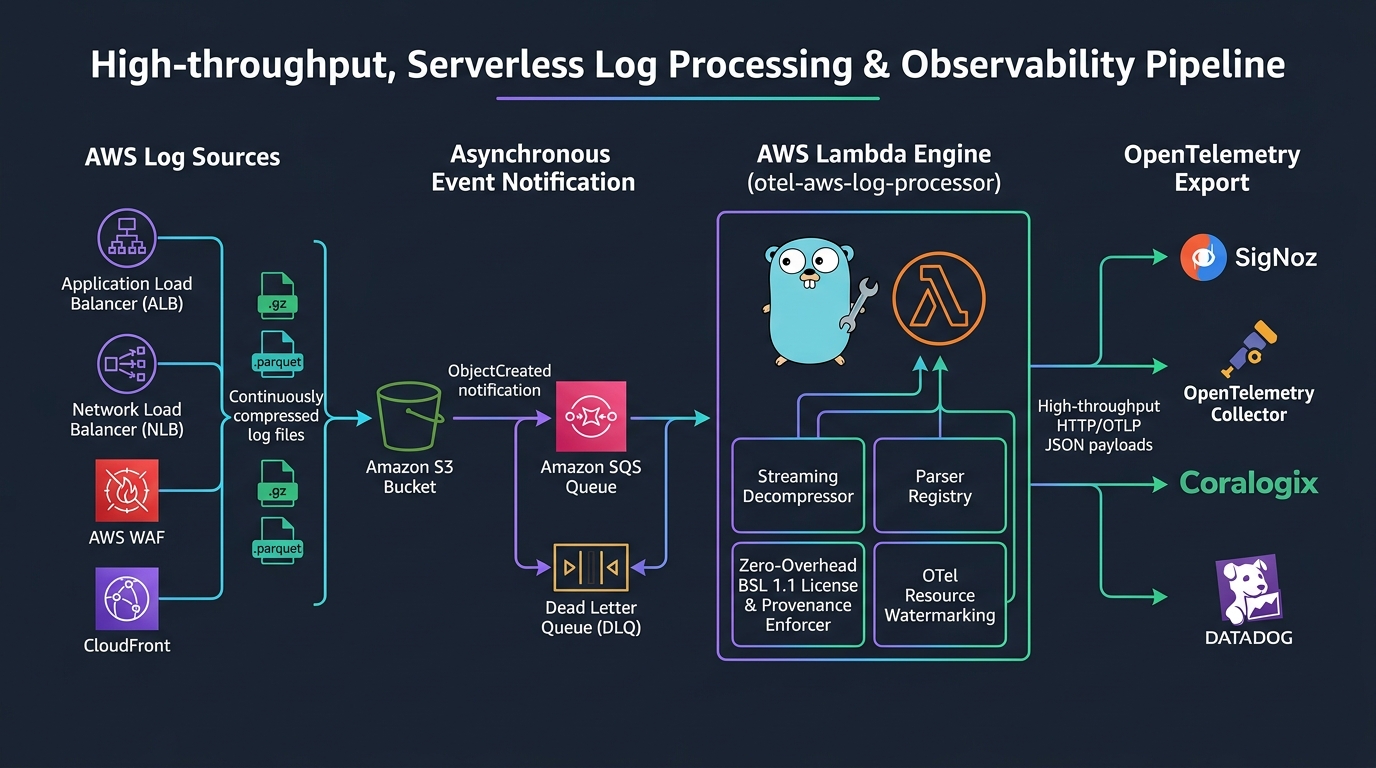
System Topology Diagram
flowchart LR
    subgraph AWS_Sources["1. AWS Traffic Sources"]
        ALB["ALB Access Logs
(.log.gz)"]
        NLB["NLB Flow Logs
(.log.gz)"]
        CF["CloudFront Logs
(.gz / .parquet)"]
        WAF["AWS WAF Logs
(.json.gz)"]
    end

    subgraph Storage_Events["2. Event Routing"]
        S3[("S3 Buckets
AWSLogs/ & aws-waf-logs-*")]
        EB["Amazon EventBridge
ObjectCreated Rules"]
        SQS[("Amazon SQS Queue
with Redrive DLQ")]
    end

    subgraph Lambda_Engine["3. Go Lambda Processor (provided.al2023)"]
        Consumer["SQS Event Batch Handler
ReportBatchItemFailures"]
        Streamer["S3 Object Stream Reader
(Gzip / Parquet)"]
        Registry["Parser Registry
ALB | NLB | CF | WAF"]
        OTelMap["LogAdapter Semantic Transformer
Resource & Field Mapper"]
        Batcher["OTLP HTTP Client
Concurrent Worker Pool & Retry"]
    end

    subgraph Destination["4. OTLP HTTP Ingestion"]
        Collector["OpenTelemetry Collector
(otlphttp /v1/logs)"]
        SigNoz["SigNoz / Datadog / Coralogix"]
    end

    ALB --> S3
    NLB --> S3
    CF --> S3
    WAF --> S3

    S3 -->|ObjectCreated| EB
    EB -->|Push Notification| SQS
    SQS -->|SQSEvent| Consumer

    Consumer --> Streamer
    Streamer --> Registry
    Registry --> OTelMap
    OTelMap --> Batcher
    Batcher -->|POST application/json| Collector
    Batcher -->|POST application/json| SigNoz
SQS Batch Handling & Partial Failure Resilience
sequenceDiagram
    autonumber
    actor AWS as AWS S3 / EventBridge
    participant SQS as SQS Queue
    participant L as Lambda Handler
    participant S3 as Amazon S3 API
    participant OTLP as OTLP Endpoint (HTTP)

    AWS->>SQS: Push ObjectCreated notification
    SQS->>L: Invoke with batch of up to 10 messages
    loop For each SQS Message in Batch
        L->>S3: GetObject (stream body)
        alt Matching Parser Found
            L->>L: Stream uncompress and transform into LogAdapters
        else Unknown Key Format
            L->>L: Log warning and gracefully skip
        end
    end
    L->>L: Group records by ResourceKey (TargetGroup, DistId, WebACL)
    L->>OTLP: POST batches of up to MAX_BATCH_SIZE (e.g. 500)
    alt OTLP Ingest Succeeded (200 OK)
        L-->>SQS: Success (Messages deleted from SQS)
    else OTLP Ingest Failed after MAX_RETRIES
        L-->>SQS: Return BatchItemFailures=[message_id]
        Note over SQS: SQS redrives only the failed message
    end
5-Minute Quickstart Guide
Get up and running with a production-ready deployment in four simple steps.
Build the Lambda Zip Package
Compile the static ARM64 Go binary (bootstrap) optimized for the provided.al2023 runtime:
git clone https://github.com/divmora/otel-aws-log-processor.git
cd otel-aws-log-processor

# Build stripped ARM64 bootstrap binary and package lambda.zip
make lambda-packageCreate SQS Queue & IAM Policy
Create an SQS queue to buffer log notifications and attach the minimum IAM permissions:
# Create SQS Queue
aws sqs create-queue \
  --queue-name aws-access-logs-otlp-queue \
--attributes VisibilityTimeout=360,MessageRetentionPeriod=86400Deploy AWS Lambda Function
Deploy the function configured with your OTLP HTTP logs receiver endpoint:
aws lambda create-function \
  --function-name otel-aws-log-processor \
  --runtime provided.al2023 \
  --handler bootstrap \
  --architectures arm64 \
  --zip-file fileb://lambda.zip \
  --role arn:aws:iam::123456789012:role/otel-log-processor-lambda-role \
  --timeout 300 \
  --memory-size 512 \
  --environment "Variables={
      OTLP_HTTP_LOGS_ENDPOINT=https://ingest.your-collector.com/v1/logs,
      MAX_BATCH_SIZE=500,
      MAX_CONCURRENT=10
}"Configure SQS Trigger with Partial Failure Handling
Wire the SQS queue to Lambda with ReportBatchItemFailures enabled:
aws lambda create-event-source-mapping \
  --function-name otel-aws-log-processor \
  --event-source-arn arn:aws:sqs:us-east-1:123456789012:aws-access-logs-otlp-queue \
  --batch-size 10 \
  --function-response-types ReportBatchItemFailures
Supported AWS Log Formats
Learn how each AWS access log format is detected, parsed, and converted to OpenTelemetry semantic conventions.
Application Load Balancer (ALB) Access Logs
Files:*.log, *.log.gz
ALB logs provide granular telemetry for HTTP and HTTPS traffic. The processor parses standard ALB log entries, extracts end-to-end processing latencies (request_processing_time, target_processing_time, response_processing_time), converts AWS trace IDs (Root=1-...) into standard 32-hex character OpenTelemetry traceIds, and scopes logs by TargetGroup ARN.
https 2026-09-06T12:34:56.789012Z app/my-load-balancer/50dc6c495c0c9188 192.168.1.100:44322 10.0.1.50:8080 0.001 0.015 0.000 200 200 482 1024 "GET https://api.example.com:443/v1/checkout?cart=123 HTTP/1.1" "Mozilla/5.0" ECDHE-RSA-AES128-GCM-SHA256 TLSv1.2 arn:aws:elasticloadbalancing:us-east-1:123456789012:targetgroup/my-targets/73e2d6bc24d8a067 "Root=1-64abc123-abcdef0123456789abcdef01" "api.example.com" "arn:aws:acm:us-east-1:123456789012:certificate/uuid" 0 2026-09-06T12:34:56.773000Z "forward" "-" "-" "10.0.1.50:8080" "200" "-" "-"{
"timeUnixNano": "1788784496789012000",
"severityNumber": 9,
"severityText": "INFO",
"body": { "stringValue": "GET https://api.example.com:443/v1/checkout?cart=123 HTTP/1.1" },
"traceId": "64abc123abcdef0123456789abcdef01",
"spanId": "f90123bc89da4321",
"attributes": [
{ "key": "http.request.method", "value": { "stringValue": "GET" } },
{ "key": "http.response.status_code", "value": { "intValue": "200" } },
{ "key": "url.full", "value": { "stringValue": "https://api.example.com:443/v1/checkout?cart=123" } },
{ "key": "url.path", "value": { "stringValue": "/v1/checkout" } },
{ "key": "url.query", "value": { "stringValue": "cart=123" } },
{ "key": "client.address", "value": { "stringValue": "192.168.1.100" } },
{ "key": "client.port", "value": { "intValue": "44322" } },
{ "key": "server.address", "value": { "stringValue": "api.example.com" } },
{ "key": "server.socket.address", "value": { "stringValue": "10.0.1.50" } },
{ "key": "server.socket.port", "value": { "intValue": "8080" } },
{ "key": "user_agent.original", "value": { "stringValue": "Mozilla/5.0" } },
{ "key": "aws.alb.target_processing_time", "value": { "doubleValue": 0.015 } }
]
}S3 Object Key Detection Registry
The processor dispatches log files to specific parsers using high-performance string & regex matching on the S3 bucket and object key:
| Processor | Bucket Constraint | Key Pattern / Prefix | File Extensions |
|---|---|---|---|
| ALB | Any | Contains /elasticloadbalancing/ AND _app. |
.log, .log.gz |
| NLB | Any | Contains /elasticloadbalancing/ AND _net. |
.log, .log.gz |
| CloudFront | Any | Prefix AWSLogs/ AND /CloudFront/ |
.gz, .parquet |
| AWS WAF | Starts with aws-waf-logs- |
Contains /WAFLogs/ AND _waflogs_ |
.json, .gz |
Note: AWS requires S3 destination buckets for WAF logs to strictly begin with the prefix aws-waf-logs-.
Infrastructure as Code & Deployment
Production-grade templates for deploying the Lambda function, SQS buffer queue, and IAM policies.
terraform {
  required_version = ">= 1.5.0"
  required_providers {
    aws = {
      source  = "hashicorp/aws"
      version = "~> 5.0"
    }
  }
}

variable "otlp_endpoint" {
  type        = string
  description = "Destination HTTP endpoint for OTLP logs"
  default     = "https://ingest.signoz.cloud:443/v1/logs"
}

# 1. Dead Letter Queue & Primary Ingestion SQS Queue
resource "aws_sqs_queue" "dlq" {
  name                      = "otel-log-processor-dlq"
  message_retention_seconds = 1209600 # 14 days
}

resource "aws_sqs_queue" "log_queue" {
  name                       = "otel-log-processor-queue"
  visibility_timeout_seconds = 360  # Lambda timeout (300s) + 60s buffer
  message_retention_seconds  = 86400

  redrive_policy = jsonencode({
    deadLetterTargetArn = aws_sqs_queue.dlq.arn
    maxReceiveCount     = 5
  })
}

# 2. IAM Role & Least Privilege Policies
resource "aws_iam_role" "lambda_role" {
  name = "otel-log-processor-role"

  assume_role_policy = jsonencode({
    Version = "2012-10-17"
    Statement = [{
      Action    = "sts:AssumeRole"
      Effect    = "Allow"
      Principal = { Service = "lambda.amazonaws.com" }
    }]
  })
}

resource "aws_iam_policy" "lambda_policy" {
  name = "otel-log-processor-policy"

  policy = jsonencode({
    Version = "2012-10-17"
    Statement = [
      {
        Sid      = "S3LogBucketAccess"
        Effect   = "Allow"
        Action   = ["s3:GetObject"]
        Resource = ["arn:aws:s3:::*/*"]
      },
      {
        Sid    = "SQSTriggerAccess"
        Effect = "Allow"
        Action = [
          "sqs:ReceiveMessage",
          "sqs:DeleteMessage",
          "sqs:GetQueueAttributes"
        ]
        Resource = [aws_sqs_queue.log_queue.arn]
      },
      {
        Sid    = "CloudWatchLogs"
        Effect = "Allow"
        Action = [
          "logs:CreateLogGroup",
          "logs:CreateLogStream",
          "logs:PutLogEvents"
        ]
        Resource = "arn:aws:logs:*:*:*"
      }
    ]
  })
}

resource "aws_iam_role_policy_attachment" "attach" {
  role       = aws_iam_role.lambda_role.name
  policy_arn = aws_iam_policy.lambda_policy.arn
}

# 3. AWS Lambda Function (ARM64, provided.al2023)
resource "aws_lambda_function" "processor" {
  function_name = "otel-aws-log-processor"
  role          = aws_iam_role.lambda_role.arn
  handler       = "bootstrap"
  runtime       = "provided.al2023"
  architectures = ["arm64"]
  memory_size   = 512
  timeout       = 300

  filename         = "lambda.zip"
  source_code_hash = filebase64sha256("lambda.zip")

  environment {
    variables = {
      OTLP_HTTP_LOGS_ENDPOINT = var.otlp_endpoint
      MAX_BATCH_SIZE          = "500"
      MAX_RETRIES             = "3"
      MAX_CONCURRENT          = "10"
    }
  }
}

# 4. SQS Event Source Mapping with Partial Batch Failure Reporting
resource "aws_lambda_event_source_mapping" "sqs_trigger" {
  event_source_arn                   = aws_sqs_queue.log_queue.arn
  function_name                      = aws_lambda_function.processor.arn
  batch_size                         = 10
  maximum_batching_window_in_seconds = 10
  function_response_types            = ["ReportBatchItemFailures"]
}Least-Privilege IAM Policy
Attach this policy to the Lambda execution role. Ensure the S3 bucket resource matches your access log storage locations:
{
  "Version": "2012-10-17",
  "Statement": [
    {
      "Sid": "S3LogBucketAccess",
      "Effect": "Allow",
      "Action": ["s3:GetObject"],
      "Resource": "arn:aws:s3:::<your-aws-logs-bucket>/*"
    },
    {
      "Sid": "SQSTriggerAccess",
      "Effect": "Allow",
      "Action": [
        "sqs:ReceiveMessage",
        "sqs:DeleteMessage",
        "sqs:GetQueueAttributes"
      ],
      "Resource": "arn:aws:sqs:<region>:<account-id>:<your-queue-name>"
    },
    {
      "Sid": "CloudWatchLogs",
      "Effect": "Allow",
      "Action": [
        "logs:CreateLogGroup",
        "logs:CreateLogStream",
        "logs:PutLogEvents"
      ],
      "Resource": "arn:aws:logs:*:*:*"
    }
  ]
}
Destination Guides & Backends
Configure your OTLP HTTP receiver endpoint across popular observability platforms.
OpenTelemetry Collector
Enable the otlp receiver with the HTTP protocol in your collector configuration:
receivers:
  otlp:
    protocols:
      http:
        endpoint: 0.0.0.0:4318

service:
  pipelines:
    logs:
      receivers: [otlp]
      processors: [batch]
exporters: [debug, signoz, datadog]OTLP_HTTP_LOGS_ENDPOINT=http://<collector-ip>:4318/v1/logs
SigNoz (Cloud & Self-Hosted)
Directly stream to SigNoz Cloud or self-hosted OtelCollector ingest endpoint:
https://ingest.us.signoz.cloud:443/v1/logs
https://ingest.in.signoz.cloud:443/v1/logs
For self-hosted instances with Basic Auth, configure BASIC_AUTH_USERNAME and BASIC_AUTH_PASSWORD.
Coralogix
Send OTLP logs directly to regional Coralogix endpoints:
https://ingress.coralogix.us/v1/logs
Or route via an internal OpenTelemetry Collector to inject the Authorization: Bearer <private-key> header.
Datadog
Datadog Agent 7.35+ includes a native OTLP HTTP receiver:
# In datadog.yaml:
otlp_config:
  receiver:
    protocols:
      http:
endpoint: 0.0.0.0:4318OTLP_HTTP_LOGS_ENDPOINT=http://<datadog-agent>:4318/v1/logs
Environment Variables Reference
Tune batching, timeouts, concurrency, and authentication via Lambda environment variables.
| Variable | Default | Type | Description |
|---|---|---|---|
| OTLP_HTTP_LOGS_ENDPOINT | http://localhost:4318/v1/logs | string (URL) | Full HTTP/HTTPS URL destination for OTLP JSON logs payload. |
| BASIC_AUTH_USERNAME | "" | string | Optional username for HTTP Basic Authentication header. |
| BASIC_AUTH_PASSWORD | "" | string | Optional password for HTTP Basic Authentication header. |
| MAX_BATCH_SIZE | 500 | integer | Maximum number of log records bundled into a single OTLP HTTP POST request. |
| MAX_RETRIES | 3 | integer | Number of retry attempts with exponential backoff on HTTP 5xx or network errors. |
| MAX_CONCURRENT | 10 | integer | Worker goroutine pool size for parallel S3 log file reading & HTTP batch sending. |
| ENVIRONMENT | production | string | Deployment environment tier (development, staging, production, etc.). Non-production tiers are free under BSL 1.1. |
| DIVMORA_LICENSE_KEY | "" | string (JWT/Base64) | Cryptographically signed Ed25519 commercial license token required for production deployments. |
| DIVMORA_LICENSE_MODE | warn | string | Licensing enforcement mode in production: warn (non-blocking diagnostics with telemetry markers) or strict (blocks execution if unverified). |
Low Volume
< 1M logs/day- Memory: 256 MB
- MAX_BATCH_SIZE: 250
- MAX_CONCURRENT: 5
Standard (Recommended)
1M – 20M logs/day- Memory: 512 MB
- MAX_BATCH_SIZE: 500
- MAX_CONCURRENT: 10
High Scale
> 20M logs/day- Memory: 1024 MB
- MAX_BATCH_SIZE: 1000
- MAX_CONCURRENT: 20
OpenTelemetry Semantic Attributes Mapping
Adherence to the official OpenTelemetry Semantic Conventions for Cloud, HTTP, Network, and TLS.
Resource Scope Attributes (Group-Level)
| OTel Attribute Key | Example Value | Semantics & Origin |
|---|---|---|
| cloud.provider | "aws" | Cloud service provider identifier. |
| cloud.platform | "aws_elastic_load_balancing", "aws_cloudfront" | AWS managed platform type. |
| cloud.region | "us-east-1", "eu-west-1" | AWS geographical region extracted from ARN or S3 key. |
| cloud.account.id | "123456789012" | 12-digit AWS Account ID owning the resource. |
| aws.alb.target_group_arn | "arn:aws:elasticloadbalancing:us-east-1:.../tg" | Target group ARN servicing the traffic. |
| aws.cloudfront.distribution_id | "E2K55636F2K7" | CloudFront distribution ID handling edge distribution. |
Record-Level Attributes
| OTel Attribute Key | Type | Description |
|---|---|---|
| http.request.method | string | HTTP request verb (e.g. GET, POST, PUT, DELETE, OPTIONS). |
| http.response.status_code | int | Downstream HTTP response code (200, 404, 502, etc.). |
| url.full / url.path / url.query | string | Deconstructed URL components parsed automatically. |
| client.address / client.port | string / int | Client remote IPv4/IPv6 address and port. |
| server.address / server.socket.address | string | Host header domain and destination target IP. |
| user_agent.original | string | Client User-Agent header (automatically unescaped). |
| tls.cipher_suite / tls.protocol.version | string | Negotiated TLS cipher (e.g. ECDHE-RSA-AES128-GCM-SHA256) and version (TLSv1.3). |
| traceId | 32 hex string | Standard OTel trace identifier parsed from AWS X-Ray Root=1-64abc... header. |
Operations & Troubleshooting
Hardened operational patterns, CloudWatch alarms, and common remediation steps.
How does partial failure handling work?
When Lambda receives an SQS batch of 10 log file events, it processes each concurrently. If 9 succeed but 1 encounters an error (e.g. downstream network blip), the Lambda returns:
{
  "batchItemFailures": [
    { "itemIdentifier": "failed-message-id" }
  ]
}
AWS SQS only retries the failed message. The 9 successful messages are deleted immediately, preventing duplicate logs from flooding your backend.
Error: "AccessDenied" when downloading S3 object
Verify that the Lambda execution role has s3:GetObject on the target log bucket. If the S3 bucket is encrypted using an AWS KMS Customer Managed Key (CMK), you must also grant the Lambda role kms:Decrypt permissions on the KMS key ARN.
Why are logs being duplicated across executions?
Check your SQS Queue's VisibilityTimeout. It MUST be greater than or equal to 6 times the Lambda function timeout (or at minimum Lambda Timeout + 60s). If VisibilityTimeout is shorter than the Lambda execution time, SQS delivers the message to another Lambda instance while the first is still processing.
Recommended CloudWatch Alarms
- SQS DLQ Depth: Trigger alert when
ApproximateNumberOfMessagesVisible > 0on the DLQ queue. - Lambda Errors: Trigger alert when
Errors > 0for 2 consecutive evaluation periods. - Queue Backlog: Trigger alert when queue message age exceeds 15 minutes (
ApproximateAgeOfOldestMessage > 900).
Licensing & Commercial Use
Learn about DIVMORA's two-tier licensing model under the Business Source License 1.1 (BSL 1.1).
Non-Production Environments
Permitted free of charge under the BSL 1.1 Additional Use Grant for local development, staging, QA, testing, CI/CD automated validation, and proof-of-concept evaluation. Simply set ENVIRONMENT=staging or development.
Production Deployments
Operating in production AWS accounts requires a commercial license key (EULA) issued by DIVMORA Technologies. License tokens are cryptographically signed with Ed25519 and verified offline inside the Lambda runtime with sub-microsecond latency and zero external network calls.
Configuring Your License Token
Provide your cryptographic license token via the DIVMORA_LICENSE_KEY environment variable in your Lambda function configuration or Terraform module:
aws lambda update-function-configuration \
  --function-name otel-aws-log-processor \
  --environment "Variables={
    OTLP_HTTP_LOGS_ENDPOINT=https://ingest.your-collector.com/v1/logs,
    DIVMORA_LICENSE_KEY=DIV1.eyJpZCI6ImxpY18xMjM0...
  }"